Caption Studio puts animated, word-by-word captions on your Reels. Everything runs on your own laptop — no upload, no account, no watermark. Bas clip daalo, captions ready.
What you get: Hinglish / Hindi / English auto-captions · paste your script for word-perfect timing · 89 templates (44 animated, 7 Designer in the @agency.pov look) · free AI clean-up ("meTaa bijanes" → "Meta business") · sound effects · 1080p MP4 export.
Using the September version and export fails? That bug is fixed in v1.2. Purana folder delete karo, naya ZIP download karke setup dobara chalao.
What you need
- Windows: Windows 10 or 11 (64-bit), internet during setup, a few GB free space, Chrome or Edge.
- Mac: macOS on Intel or Apple Silicon, internet during setup, a few GB free space. Homebrew gets installed if missing — setup asks first.
- An NVIDIA graphics card is optional. Agar hai, transcription fast hoga.
- Phone, iPad and Chromebook won't work. Download the ZIP to a computer first — Google Drive preview se nahi chalega.
Easiest: install with AI
Don't want to do the steps yourself? Let an AI do or guide them.
Claude Code, Codex or Cursor (these can run things on your computer) — paste this and it installs Caption Studio for you:
I downloaded Caption-Studio-v1.2.zip to [where the zip is, e.g. Downloads].
1. Extract it to C:\CaptionStudio (Windows) or ~/Documents/CaptionStudio (Mac).
2. Run the setup inside the extracted folder: SETUP.bat on Windows, "Setup Mac.command" on Mac.
3. Wait until it prints "Setup complete".
4. Start Caption Studio (Caption Studio.vbs on Windows, "Caption Studio.command" on Mac) and open http://localhost:8756.
If any step fails, read the error, fix it, and tell me in simple words what you changed.
Don't install anything paid and don't delete any of my files.
ChatGPT or Gemini (free) — they can't touch your computer, but they'll walk you through it and fix every error you paste:
You are my setup helper for Caption Studio, a free app that runs on my own computer at http://localhost:8756.
My computer: [Windows 11 / Windows 10 / Mac with Apple chip / Mac with Intel].
Guide me ONE step at a time. Wait for my reply after each step.
The steps are: extract the ZIP to a short folder, run SETUP.bat (Windows) or Setup Mac.command (Mac),
wait for "Setup complete", then open Caption Studio.vbs (Windows) or Caption Studio.command (Mac).
When I paste an error message or a screenshot, tell me the exact fix in simple Hinglish.
Prefer doing it yourself? The steps are right below.
Windows setup
- Download
Caption-Studio-v1.2.zip, right-click → Extract All. - Pick a short path, for example
C:\CaptionStudio. ZIP ke andar se app mat chalao. - Double-click
SETUP.bat. If Windows shows "Windows protected your PC", click More info → Run anyway (only for the file from our link). - It installs Python 3.12, Node.js and FFmpeg if missing, then the caption engine. Wait for "Setup complete" — usually 5–15 minutes.
- Double-click
Caption Studio.vbs. Your browser opens athttp://localhost:8756.
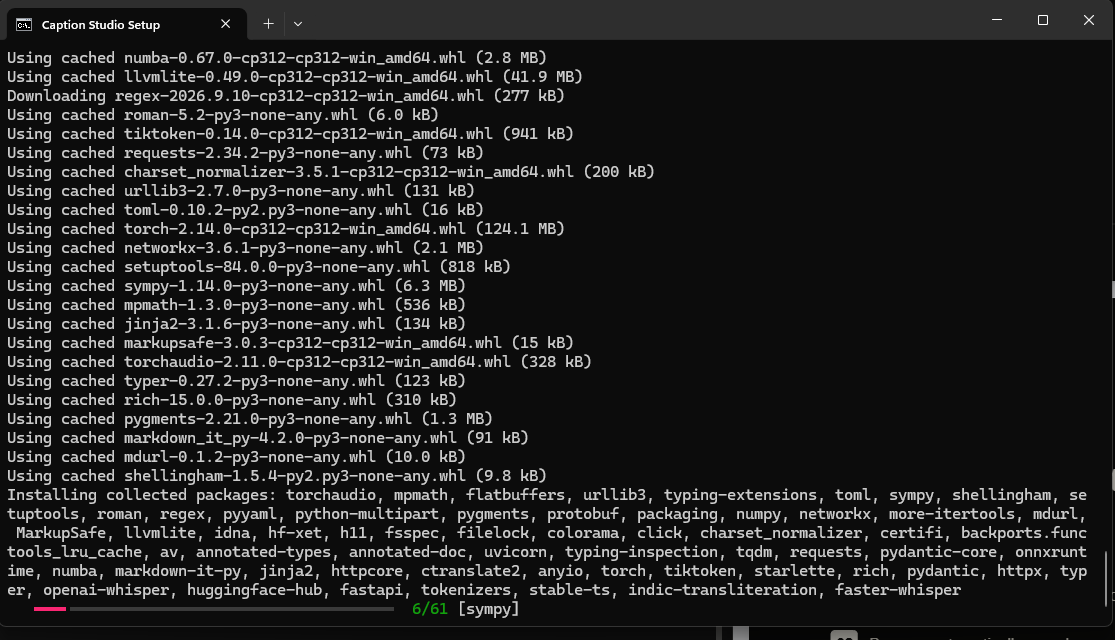
To stop it: Stop Caption Studio.bat. Not opening? Run start.bat — the black window shows the error.
Mac setup
- Unzip the folder into Documents.
- Double-click
Setup Mac.command. macOS says it can't be opened? Right-click → Open → Open. - It asks before installing Homebrew, then installs Python 3.12, Node.js and FFmpeg. Wait for "Setup complete" (5–15 min).
- Double-click
Caption Studio.command. Keep the Terminal window open; the app opens athttp://localhost:8756. - To stop: close that Terminal window, or double-click
Stop Caption Studio.command.
The first export (Windows or Mac) needs internet once — it downloads the rendering browser (~100 MB). Uske baad offline bhi chalega.
Make captions
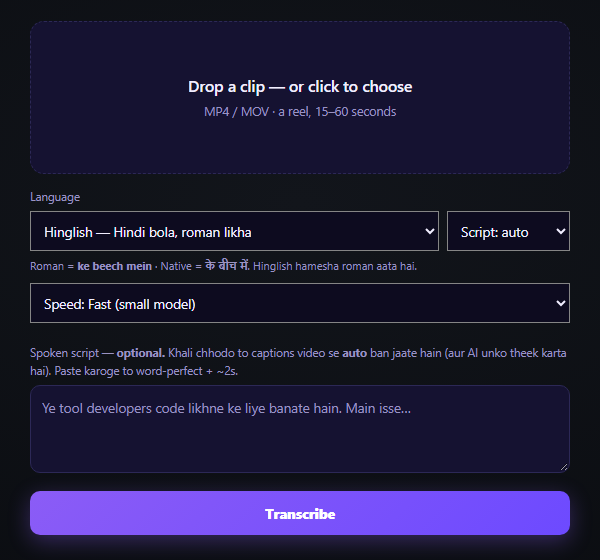
- Drop your reel (MP4 / MOV, 15–60 s) or click to choose.
- Language: Hinglish (default), Hindi or English. Output: Roman ya Native.
- Speed: Fast, or Accurate (bigger model — slower without NVIDIA).
- Optional: paste the exact spoken script — words become perfect, takes ~2 seconds.
- Click Transcribe. The first run is slower because the speech model downloads once.
- Fix any word in the Words list; drag blocks on the timeline to fix timing.
- Pick a template — try the ✦ Animated filter. Drag the captions where you want them.
- Optional: add sound effects in the Sound tab.
- Export MP4 (1080p or 720p). Rendering ke time laptop sleep na ho.
Instagram safe zone: keep captions in the middle band — about 14% from the top down to 65% of the height. Neeche Instagram ka caption aur buttons aa jaate hain.
Free AI clean-up (Gmail only)
The app works without any account. For much cleaner Hinglish, add a free Google Gemini key:
- In the app click AI Settings (top right) → "Key kahan se milegi".
- Log in to Google AI Studio with Gmail → Create API key → copy it.
- Paste it in the app → Save & test.
The key is saved in your user folder (~/.caption-studio), never inside the app folder.
Troubleshooting
| Problem | Fix |
|---|---|
| First export fails or hangs | Keep the internet on — the first export downloads the rendering browser (~100 MB) once. If antivirus removed it, export again: it re-downloads. |
| Export fails (old version) | Delete the old folder, set up v1.2.2 fresh — the export bugs are fixed there. |
| "winget missing" (Windows) | Install App Installer from the Microsoft Store, run SETUP.bat again. |
| Tool not found after install | Restart Windows, run SETUP.bat again. |
| localhost doesn't open | Run start.bat (Windows) / Caption Studio.command (Mac) and read the error. |
| Port 8756 already in use | Run the Stop script, then start again. |
| Strange Node errors | Move the folder to a short path like C:\CaptionStudio. |
| Slow transcription | Use Speed: Fast — Accurate is slow without an NVIDIA card. |